
Create a variable document for use with traditional FreeForm
Creating the variable document requires a desktop publishing application that provides a mail merge function, a database application, or a page layout application that supports scripting.
Your application takes information from a list or database and merges it into an existing document that accepts the master information. Each application has different controls for this function.
-
Add the variable
information in the appropriate places in your
document.
Note: The variable document must have the same page count as the master page document. For example, if a master document has a record length of four pages, all the variable documents must have a record length of four pages. You can use Enhanced FreeForm to add empty pages to the last record of the variable document, if necessary.Figure 1. Variable document
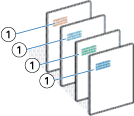
1 Variable element