
Advanced page numbering workspace
The Numbering and Stamps pane provides a workspace for advanced page numbering.
In Fiery JobMaster, you can access the Numbering and Stamps pane by selecting a page or pages in the Page View pane, and then selecting .
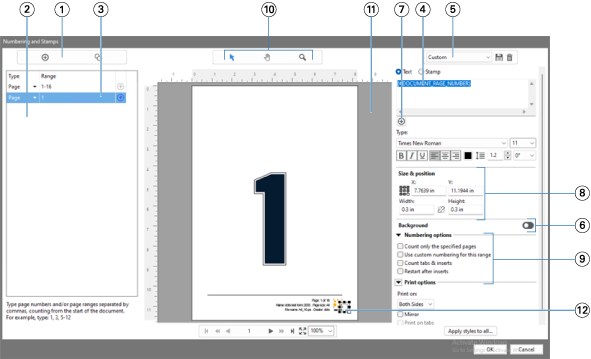
| 1 | Add Range and Copy Range icons for adding ranges, and copying a range. |
| 2 | Type and Range panes displays added ranges for document, chapters, and pages. |
| 3 | Click the second set of ellipses to open a window that allows you to specify Range and Repeat options. |
| 4 | Text field displays macros for the numbering options you
specify from clicking the plus sign icon ( ) below the text field. You can add text to the macros. ) below the text field. You can add text to the macros. |
| 5 | Presets menu, and Save Preset and Delete Preset icons. |
| 6 | Controls for enabling and disabling a background for the page number field in the document. |
| 7 | The plus sign icon () opens menus for specifying page numbers, chapter numbers, date, time,
and the name of the document. |
| 8 | Under Size & position, you can input X, Y, Width, and Height information. |
| 9 | Advanced numbering and printing options. |
| 10 | Select, Move, and Zoom icons for the preview pane. |
| 11 | Preview of the job. The navigation and zoom controls provided below the preview. |
| 12 | Field for page numbering display, can be resized and moved. |