
Preview a raster image
If a job is processed, you can view thumbnails of the content in the Preview pane in Job Center, or in the Preview window, where the raster image is displayed.
You can open Fiery ImageViewer in the Preview window.
The following illustration shows the raster preview of a job:
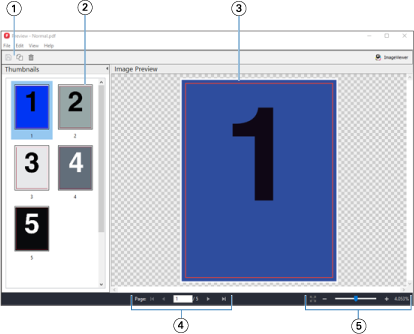
| 1 | Toolbar icons for saving the job, and for duplicating and deleting the selected page(s) in the job |
| 2 | Thumbnails |
| 3 | Raster file |
| 4 | Navigation controls for paging through the job and displaying the sheet number |
| 5 | Zoom control icons for Fit Page and Zoom Ratio |