
Create a variable document
Creating a variable document to use with the file merge workflow in FreeForm Create.
Keep in mind the following.
- FreeForm Create only supports variable documents in the .pdf format. To create your variable document, use an application that can save the document as a PDF.
- To create a variable document, use either a desktop publishing application that provides a mail merge function, or a page layout application with scripting support.
In the file merge workflow, FreeForm Create uses a variable document to provide the variable information used in the combined document.
A desktop publishing application or a page layout application takes information from a list or database and creates a variable document for use with a master document. Each application has different controls for this function.
- Add the variable information in the appropriate places
in your document.
Figure 1. Variable document
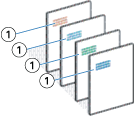
1 Variable element